ATAK Integration & Deployment
Integrate Empyrean with ATAK via CoT: push fused tracks to TAK Server, filter by domain, and automate event-driven tasking.
The Mission
Learn how Empyrean Defense integrations with the Android Team Awareness Kit (ATAK) which provides blue force tracking, chat groups, and cross-organizational information sharing and a "map on a screen". Empyrean Defense currently integrates with TAK Servers to facilitate pushing data as Cursor-on-Target (CoT) from Live and Fused Tracks on the Empyrean Defense COP.
The Problem
Military, intelligence communities, federal and local law enforcement, public safety organizations, and mutual aid groups often use ATAK as their Situational Awareness (SA)/Command & Control (C2) backbone. The replacement cost of this is very high. Between mission packs, federation, EUD enrollment, plugins, and custom integrations all represent a shared operational tempo for organizations who use ATAK.
Plenty of tools integrate with ATAK, often blindly sending their CoT over without much control, and do not support one-to-many integrations. Empyrean Defense treats ATAK server destinations as first class outbound connections within our Data Fabric, allowing you to connect to multiple servers and share only what you want with them. From there, let ATAK do what ATAK is great at and route the right data to the right EUDs at the right time.
Modules Used
- Integrations & Data Fabric - native Cursor-on-Target interface layer for CoT import/export with multi-server support and TLS certificate management
- Policy & Decision Layer - flow-based and multi-conditional policies for event-driven ATAK tasking, including GeoChat alerts and marker placement
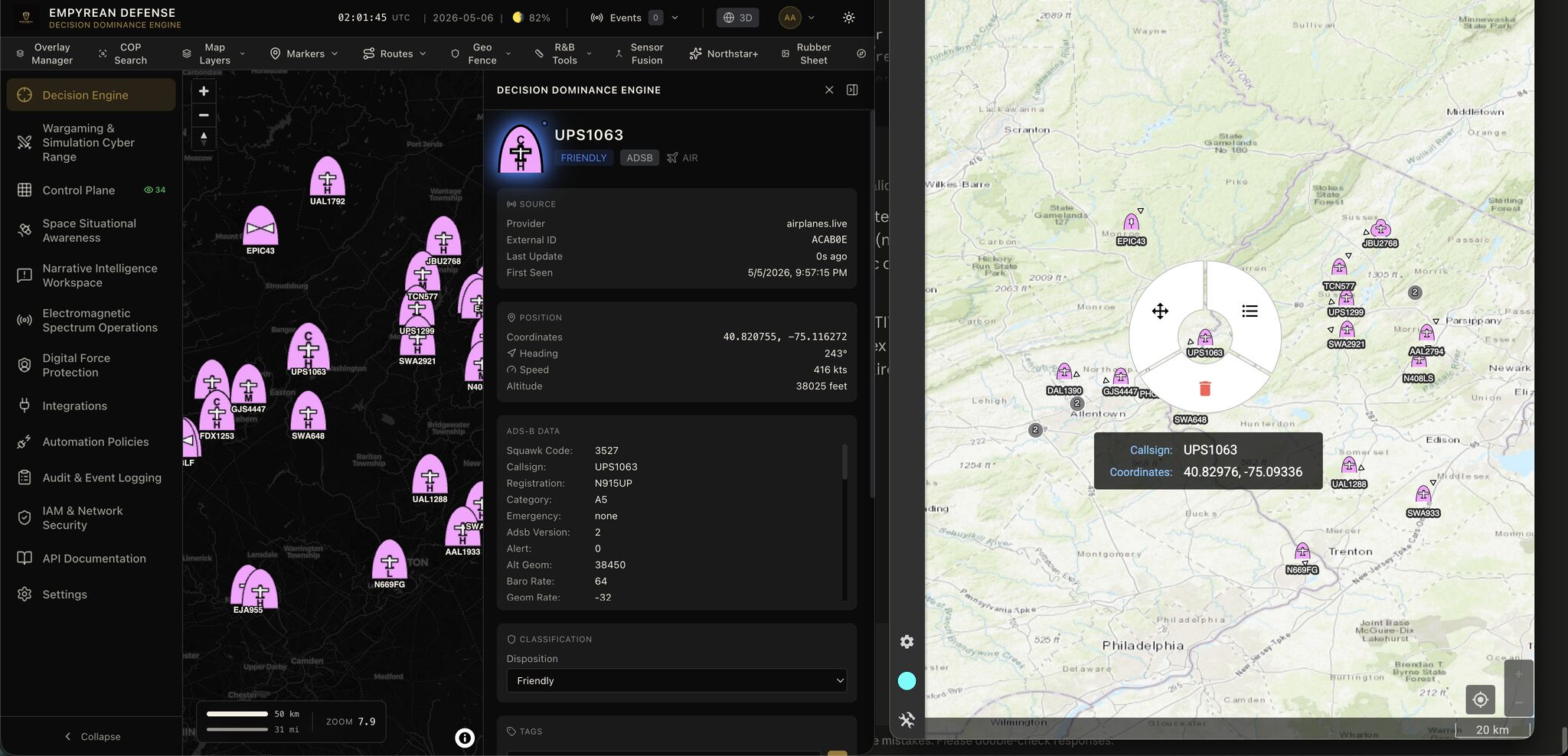
- Common Operational Picture - live and fused tracks rendered with MIL-STD-2525 symbology, the source of all outbound CoT data
- Fusion & Decision Engine - multi-hypothesis tracking that produces the fused tracks sent to ATAK as unified entities rather than raw sensor hits
The Connectivity Stack
Empyrean Defense has a native Cursor-on-Target interface layer in our Data Fabric, allowing you to import CoT data packages into Empyrean Defense, and enables us to export our own ontologies ("LiveTrack" and "FusedTrack") out as CoT Messages.
We support CoT over TLS with Server Certificates, or for testing, you can ignore this and we will send raw CoT to whatever TCP/UDP port you configure for CoT/CoT-over-TLS. We automatically handle translating our schema into CoT, ensuring that the MIL-STD-2525 symbology, the Remarks schema extension, and general Position Location Information (PLI) and a TTL is populated, matching the downstream integration.
You can choose to send Domain-wide data (such as all Space tracks from tracked satellites and space vehicles), all Surface domain data, or Information domain to integrate with ACLED or GDELT 2.0 geocoded information events.
How To Connect
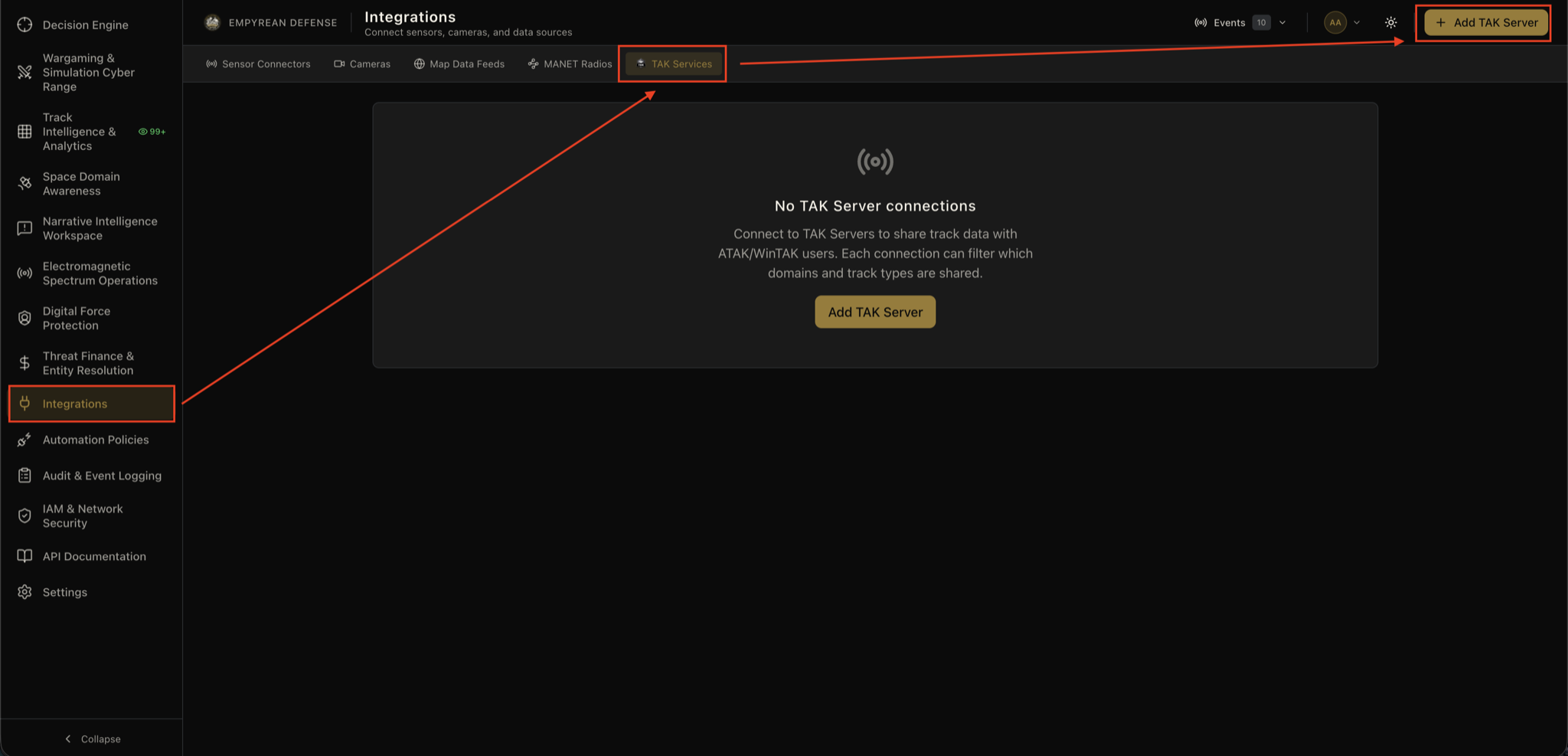
To integrate one or more ATAK Servers with the Empyrean Defense Decision Dominance Engine (DDE) all you need to do is navigate to the Integrations menu and select the TAK Services header. Once there, select Add TAK Server to open the configuration modal.
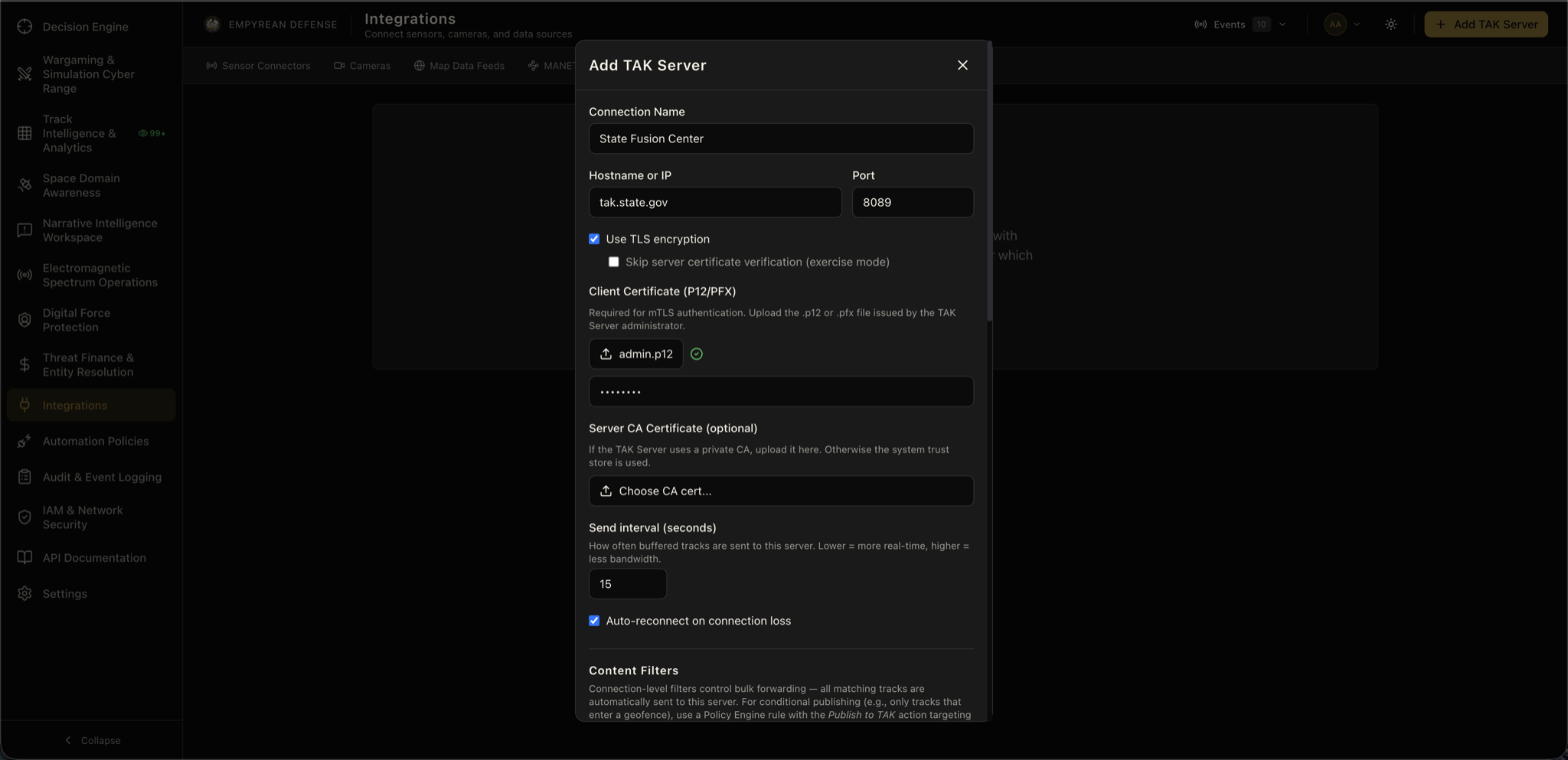
Once here, configure the following settings as per your ATAK server administrator's instructions and how you currently use ATAK Servers.
- Connection Name: A human-readable name that represents the connection, this is NOT your hostname, but a descriptive alias such as "State Police ATAK" or "101st Airborne Division ATAK".
- Hostname or IP: The hostname of your ATAK server, or just the IP address of it, if you do not have DNS configured in-line. Do not add the URL here.
- Port: The port, as configured, that accepts CoT or CoT-over-TLS. Typically, this is 8089 for TLS or 8087 for unencrypted CoT. This can be any port number depending on your configuration.
- Use TLS encryption: This toggle confirms if you will use TLS or not; it defaults to True (checked).
- Skip server certificate verification (exercise mode): This toggle allows you to ignore certificate-based validation for testing; it defaults to False (unchecked).
- Client Certificate (P12/PFX): Your client mTLS certificate generated when you first configured your server
- And optional text field appears to enter the certificate password, this defaults to atakatak on most deployments, but confirm with your administrator if this was changed or removed. This value is encrypted into your tenant's integrations database table using AES-128 bulk encryption.
- Server CA Certificate (optional): If you are using a private certificate authority such as generated by a 3rd party Public Key Infrastructure (PKI) provider, a Hardware Security Module (HSM), or cloud-based service such as Amazon Certificate Manager (ACM) Private Certificate Authority (PCA) you will upload that here.
- Send interval (seconds): How often you want to flush Live Track or Fused Track data from Empyrean Defense into your ATAK Server; defaults to 15 seconds.
- Auto-reconnect on connection loss: This toggle determines if Empyrean Defense will automatically attempt reconnection if your ATAK Server goes down or not. Defaults to True (checked). If you do not use this, you will need to manually test and reconnect from within the integration UI element.
Once you are connected, you can test connectivity manually as well as manually disabled connectivity if the server has gone offline to avoid wasting network resources in your Empyrean Defense deployment.
Choose What to Send to ATAK
By default, ALL data is sent to ATAK, irrespective of what the integration class or domain is. If you have it configured in the Decision Dominance Engine for Live Track or Fused Tracks, then it is sent over. However, you have per-Server filtration settings to send specific domains or track types. Within our ontology, it means the following:
- Domain: Refers to the warfighting or topical domain or group that the track belongs to. For instance, ADS-B, Radar, or Drone Remote ID are Air Domain while surface-based X-band radar, AIS, or VMS data is Surface Domain.
- Type: This is a subclassification mechanism of grouping in our schema, typically by the identification mechanism (AIS, ADS-B, Remote ID) or by specific integrations (RADAR\_ECHOSHIELD refers to radar data from an Echodyne EchoShield radar).
In the ATAK Server Configuration modal, scroll down to the Content Filters section to apply the filters. If you leave everything untoggled, then by default everything is sent, as previously mentioned. Once you toggle a specific domain or track type, then only that data will be sent at most.
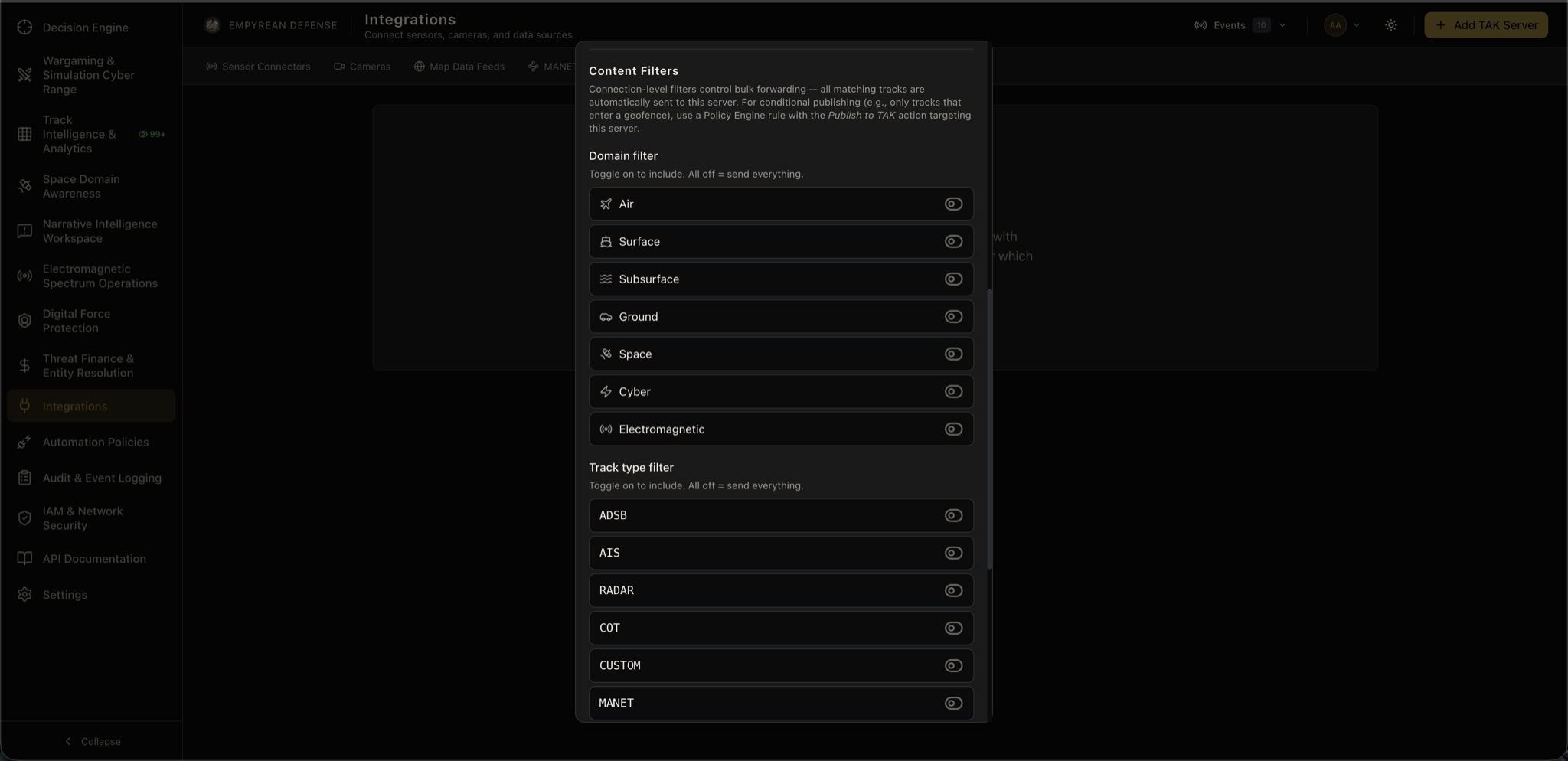
This content filtering is also a good resource consumption control; DDE can scale to 100s of 1000s of tracks per second sustained from radars, sonobuoys, remote sensors, and more. Unless you have a properly hardened and appropriately resourced and auto-scaling ATAK Server, that level of throughput can overwhelm it.
Additionally, if you already have civilian-specific data feeds such as AIS or ADS-B configured with a 3rd party provider or your own integrations, you can opt out of sending them from Empyrean Defense and instead send data from radars, Counter UAS sensors, acoustic arrays, or otherwise.
Policy-Driven Integrations
As part of the Joint All-Domain Operations (JADO) and Joint All-Domain Command and Control (JADC2) framework, Act is the final gate once you have Sensed and Made Sense of your data. To support this in an auditable, centralized, and repeatable fashion, you can use the Empyrean Defense Policy Automation Engine to ensure appropriate conditions are met to send data into your ATAK server.
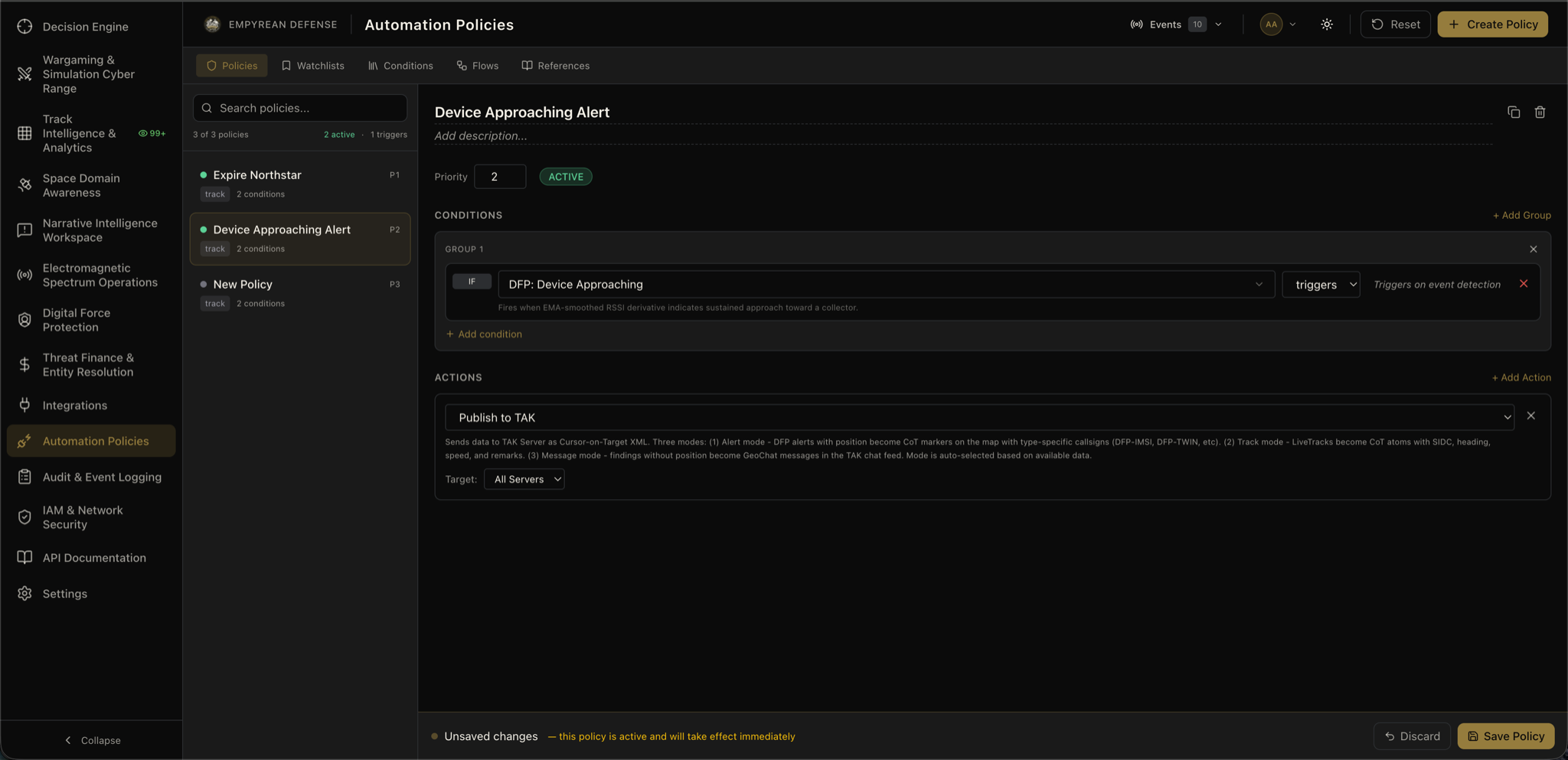
Once you have saved one or more ATAK server integrations, you can use the "Send to TAK" Policy Action in the Policy Automation Engine to only send data to your ATAK Server that meets certain conditions. For the most part, the Live Track or Fused Track is sent over. However, the Policy Engine also supports moving markers or sending alerts as GeoChats to your ATAK Server for non-kinematic outcomes. For instance, alerting users to changing space weather or maritime weather conditions, or alerting users to Co-Travelers detected by our Digital Force Protection module.
By default, you target all servers; however, you can select one or more specific Servers depending on your use case.
Related Reading
- What is ATAK? - the full guide to the TAK ecosystem
- ATAK FAQ - quick answers on ATAK, CoT, and integration paths
- What is a Common Operating Picture? - the fused COP that generates the tracks sent to ATAK
- What is Intelligence Fusion? - how fused tracks are produced before reaching ATAK
- Integrations - the full list of Empyrean connectors and data fabric interfaces
Full technical capability breakdown:
View full capability page →